Python

ACTL3143 & ACTL5111 Deep Learning for Actuaries

Patrick Laub

Data Science & Python

Lecture Outline

  • Data Science & Python

  • Python Data Types

  • Collections

  • Control Flow

  • Python Functions

  • Import syntax

  • Lambda functions

About Python

First released on 20 February 1991

An open-source scripting language, named after Monty Python

Led by its “benevolent dictator for life” Guido, until his retirement, now led by Python Software Foundation

Python packages are downloaded at a rate of ~6B/day

Guido van Rossum, creator of Python. Now Python has >3.6K contributors and 1.7M LOC (C).

Designed as a beautiful, simple, and readable language

import this
The Zen of Python, by Tim Peters

Beautiful is better than ugly.
Explicit is better than implicit.
Simple is better than complex.
Complex is better than complicated.
Flat is better than nested.
Sparse is better than dense.
Readability counts.
Special cases aren't special enough to break the rules.
Although practicality beats purity.
Errors should never pass silently.
Unless explicitly silenced.
In the face of ambiguity, refuse the temptation to guess.
There should be one-- and preferably only one --obvious way to do it.
Although that way may not be obvious at first unless you're Dutch.
Now is better than never.
Although never is often better than *right* now.
If the implementation is hard to explain, it's a bad idea.
If the implementation is easy to explain, it may be a good idea.
Namespaces are one honking great idea -- let's do more of those!

Easy to learn language, popular first language, taught in high schools

Uses for Python
It is a general purpose language

Python powers:

  • Instagram
  • Spotify
  • Netflix
  • Uber
  • Reddit…

Python is on Mars.

Python metrics

TIOBE Index (May 2026)

Python is #1 with a 19.98% rating, well ahead of C (11.55%) and Java (7.94%).

Stack Overflow 2025

Python is the #1 most-used language among those learning to code (71.8%) and #4 overall (57.9%) — a 7-point jump from 2024.

JetBrains 2025

86% of Python developers use it as their main language. Top uses: data science (51%), web (46%), machine learning (41%).

Popularity on GitHub
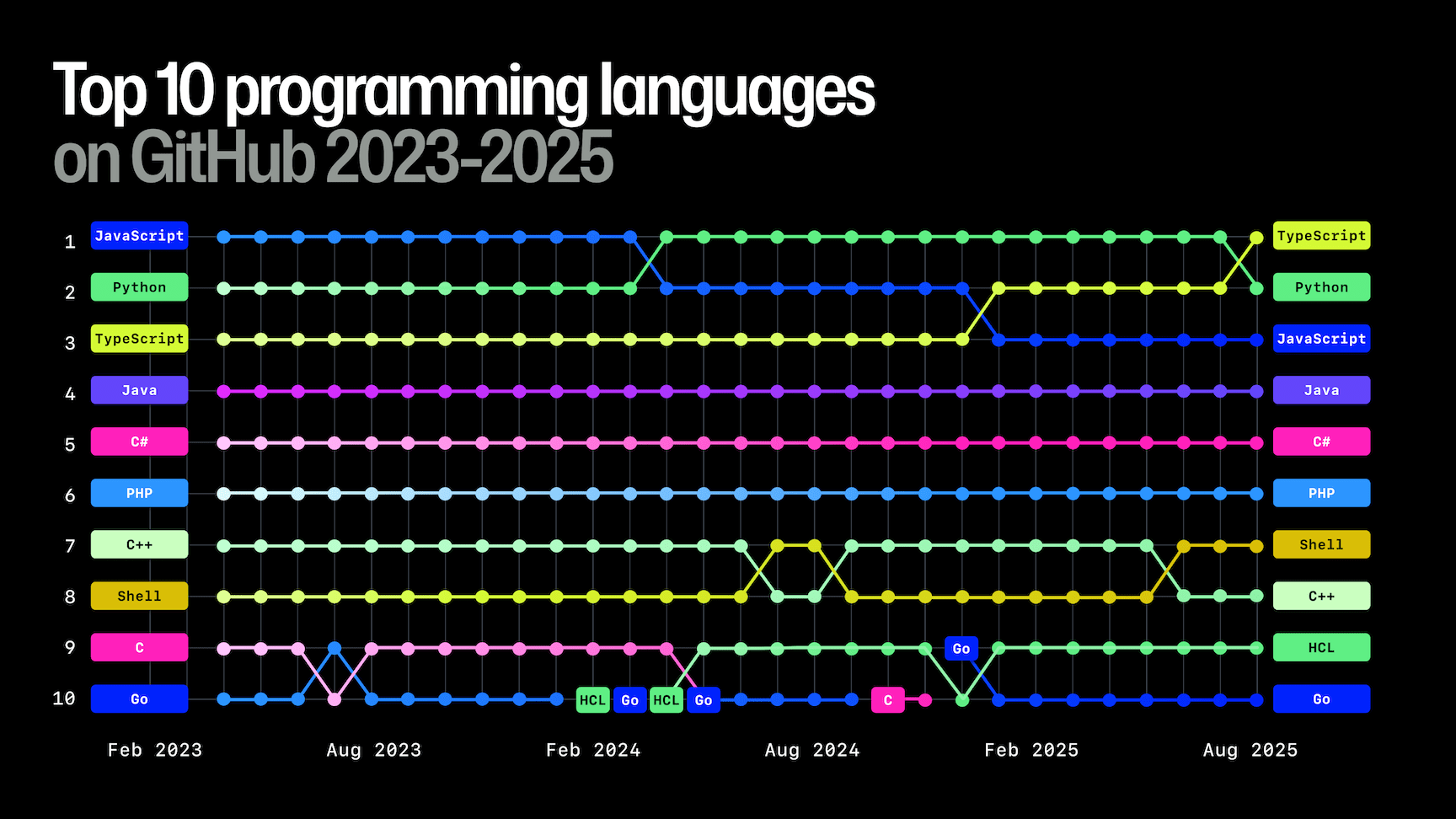
From the 2025 State of the Octoverse

Popularity on GitHub II

“What else we’re seeing

Python dominates AI projects. It remains the clear leader inside AI-tagged repositories, where Jupyter Notebook usage nearly doubled in 2025 offering evidence of its role as the go-to language for prototyping, training, and orchestrating AI workloads. GitHub’s 2025 State of the Octoverse

Python and machine learning

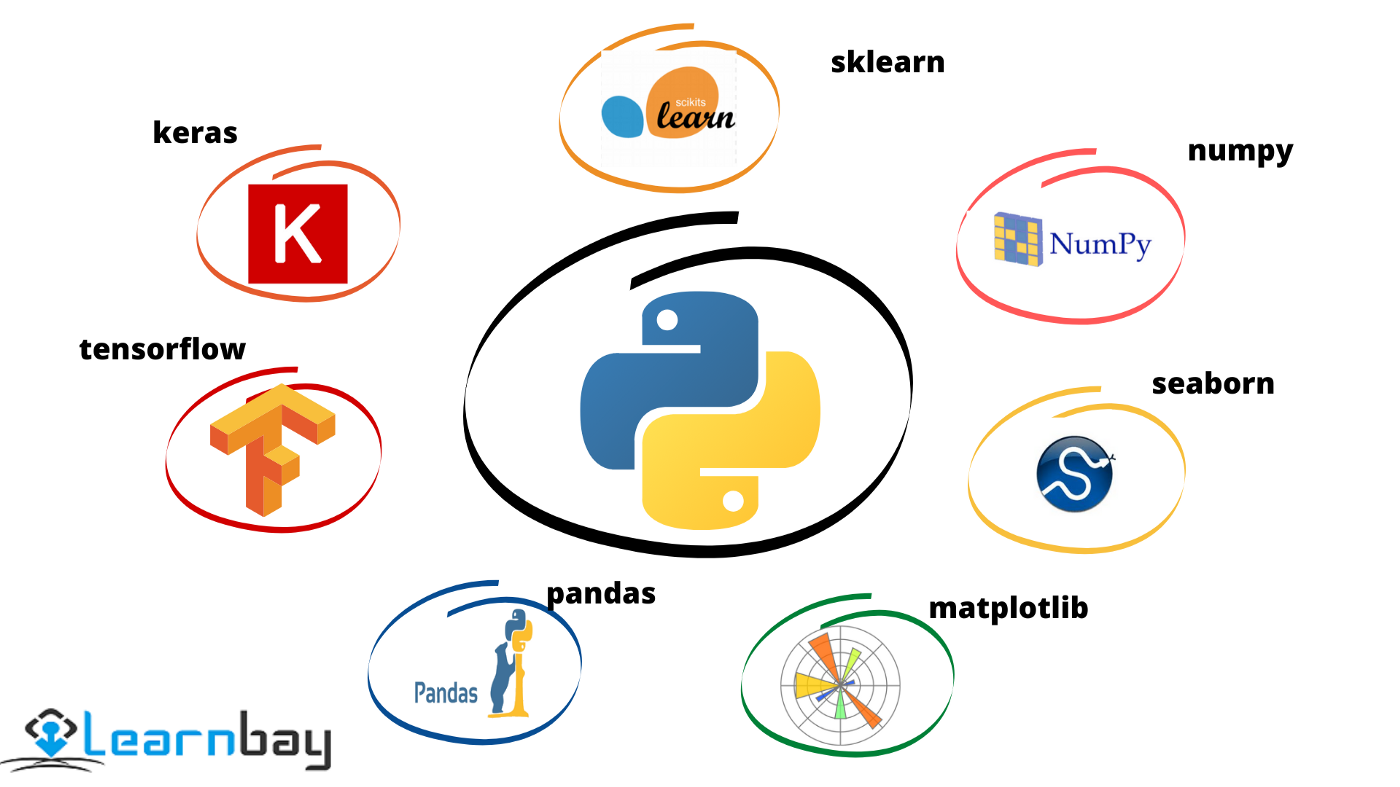
…[T]he entire machine learning and data science industry has been dominated by these two approaches: deep learning and gradient boosted trees… Users of gradient boosted trees tend to use Scikit-learn, XGBoost, or LightGBM. Meanwhile, most practitioners of deep learning use Keras, often in combination with its parent framework TensorFlow. The common point of these tools is they’re all Python libraries: Python is by far the most widely used language for machine learning and data science.

“The Story of Python and how it took over the world”

Python: The Documentary

Disclaimer on following slides

These slides are for an audience who already knows programming fundamentals (variables, control flow, functions, etc.) but just don’t know how they work in Python.

Python Data Types

Lecture Outline

  • Data Science & Python

  • Python Data Types

  • Collections

  • Control Flow

  • Python Functions

  • Import syntax

  • Lambda functions

Variables and basic types

1 + 2
3
x = 1
x + 2.0
3.0
type(2.0)
float
type(1), type(x)
(int, int)
does_math_work = 1 + 1 == 2
print(does_math_work)
type(does_math_work)
True
bool
contradiction = 1 != 1
contradiction
False

Shorthand assignments

If we want to add 2 to a variable x:

x = 1
x = x + 2
x
3
x = 1
x += 2
x
3

Same for:

  • x -= 2 : take 2 from the current value of x ,
  • x *= 2 : double the current value of x,
  • x /= 2 : halve the current value of x.

Strings

name = "Patrick"
surname = "Laub"
coffee = "This is Patrick's coffee"
quote = 'And then he said "I need a coffee!"'
name + surname
'PatrickLaub'
greeting = f"Hello {name} {surname}"
greeting
'Hello Patrick Laub'
"Patrick" in greeting
True

and & or

name = "Patrick"
surname = "Laub"
name.istitle() and surname.istitle()
True
full_name = "Dr Patrick Laub"
full_name.startswith("Dr ") or full_name.endswith(" PhD")
True

Important

The dot is used to denote methods, it can’t be used inside a variable name.

i.am.an.unfortunate.R.users = True
---------------------------------------------------------------------------
NameError                                 Traceback (most recent call last)
Cell In[18], line 1
----> 1 i.am.an.unfortunate.R.users = True

NameError: name 'i' is not defined

help to get more details

help(name.istitle)
Help on built-in function istitle:

istitle() method of builtins.str instance
    Return True if the string is a title-cased string, False otherwise.

    In a title-cased string, upper- and title-case characters may only
    follow uncased characters and lowercase characters only cased ones.

f-strings

print(f"Five squared is {5*5} and five cubed is {5**3}")
print("Five squared is {5*5} and five cubed is {5**3}")
Five squared is 25 and five cubed is 125
Five squared is {5*5} and five cubed is {5**3}

Use f-strings and avoid the older alternatives:

print(f"Hello {name} {surname}")
print("Hello " + name + " " + surname)
print("Hello {} {}".format(name, surname))
print("Hello %s %s" % (name, surname))
Hello Patrick Laub
Hello Patrick Laub
Hello Patrick Laub
Hello Patrick Laub

Converting types

digit = 3
digit
3
type(digit)
int
num = float(digit)
num
3.0
type(num)
float
num_str = str(num)
num_str
'3.0'

Quiz

What is the output of:

x = 1
y = 1.0
print(f"{x == y} and {type(x) == type(y)}")
True and False

What would you add before line 3 to get “True and True”?

x = 1
y = 1.0
x = float(x)  # or y = int(y)
print(f"{x == y} and {type(x) == type(y)}")
True and True

Collections

Lecture Outline

  • Data Science & Python

  • Python Data Types

  • Collections

  • Control Flow

  • Python Functions

  • Import syntax

  • Lambda functions

Lists

desires = ["Coffee", "Cake", "Sleep"]
desires
['Coffee', 'Cake', 'Sleep']
len(desires)
3
desires[0]
'Coffee'
len(desires[0])
6
desires[-1]
'Sleep'
desires[2] = "Nap"
desires
['Coffee', 'Cake', 'Nap']

Slicing lists

print([0, 1, 2])
desires
[0, 1, 2]
['Coffee', 'Cake', 'Nap']
desires[0:2]
['Coffee', 'Cake']
desires[0:1]
['Coffee']
desires[:2]
['Coffee', 'Cake']

A common indexing error

desires[1.0]
---------------------------------------------------------------------------
TypeError                                 Traceback (most recent call last)
Cell In[39], line 1
----> 1 desires[1.0]

TypeError: list indices must be integers or slices, not float
desires[: len(desires) / 2]
---------------------------------------------------------------------------
TypeError                                 Traceback (most recent call last)
Cell In[40], line 1
----> 1 desires[: len(desires) / 2]

TypeError: slice indices must be integers or None or have an __index__ method
len(desires) / 2, len(desires) // 2
(1.5, 1)
desires[: len(desires) // 2]
['Coffee']

Editing lists

desires = ["Coffee", "Cake", "Sleep"]
desires.append("Gadget")
desires
['Coffee', 'Cake', 'Sleep', 'Gadget']
desires.pop()
'Gadget'
desires
['Coffee', 'Cake', 'Sleep']
desires.sort()
desires
['Cake', 'Coffee', 'Sleep']
desires[3] = "Croissant"
---------------------------------------------------------------------------
IndexError                                Traceback (most recent call last)
Cell In[47], line 1
----> 1 desires[3] = "Croissant"

IndexError: list assignment index out of range

None

desires = ["Coffee", "Cake", "Sleep", "Gadget"]
sorted_list = desires.sort()
sorted_list
type(sorted_list)
NoneType
sorted_list is None
True
bool(sorted_list)
False
desires = ["Coffee", "Cake", "Sleep", "Gadget"]
sorted_list = sorted(desires)
print(desires)
sorted_list
['Coffee', 'Cake', 'Sleep', 'Gadget']
['Cake', 'Coffee', 'Gadget', 'Sleep']

Tuples (‘immutable’ lists)

weather = ("Sunny", "Cloudy", "Rainy")
print(type(weather))
print(len(weather))
print(weather[-1])
<class 'tuple'>
3
Rainy
weather.append("Snowy")
---------------------------------------------------------------------------
AttributeError                            Traceback (most recent call last)
Cell In[54], line 1
----> 1 weather.append("Snowy")

AttributeError: 'tuple' object has no attribute 'append'
weather[2] = "Snowy"
---------------------------------------------------------------------------
TypeError                                 Traceback (most recent call last)
Cell In[55], line 1
----> 1 weather[2] = "Snowy"

TypeError: 'tuple' object does not support item assignment

One-length tuples

using_brackets_in_math = (2 + 4) * 3
using_brackets_to_simplify = (1 + 1 == 2)
failure_of_atuple = ("Snowy")
type(failure_of_atuple)
str
happy_solo_tuple = ("Snowy",)
type(happy_solo_tuple)
tuple
cheeky_solo_list = ["Snowy"]
type(cheeky_solo_list)
list

Dictionaries

phone_book = {"Patrick": "+61 1234", "Café": "(02) 5678"}
phone_book["Patrick"]
'+61 1234'
phone_book["Café"] = "+61400 000 000"
phone_book
{'Patrick': '+61 1234', 'Café': '+61400 000 000'}
phone_book.keys()
dict_keys(['Patrick', 'Café'])
phone_book.values()
dict_values(['+61 1234', '+61400 000 000'])
factorial = {0: 1, 1: 1, 2: 2, 3: 6, 4: 24, 5: 120, 6: 720, 7: 5040}
factorial[4]
24

Quiz

What does this print out?

animals = ["dog", "cat", "bird"]
animals.append("teddy bear")
animals.pop()
animals.pop()
animals.append("koala")
animals.append("kangaroo")
print(f"{len(animals)} and {len(animals[-2])}")
4 and 5

Control Flow

Lecture Outline

  • Data Science & Python

  • Python Data Types

  • Collections

  • Control Flow

  • Python Functions

  • Import syntax

  • Lambda functions

if and else

age = 50
if age >= 30:
    print("Gosh you're old")
Gosh you're old
if age >= 30:
    print("Gosh you're old")
else:
    print("You're still young")
Gosh you're old

The weird part about Python…

if age >= 30:
    print("Gosh you're old")
else:
print("You're still young")
  Cell In[69], line 4
    print("You're still young")
    ^
IndentationError: expected an indented block after 'else' statement on line 3

Warning

Watch out for mixing tabs and spaces!

An example of aging

age = 16

if age < 18:
    friday_evening_schedule = "School things"
if age < 30:
    friday_evening_schedule = "Party 🥳🍾"
if age >= 30:
    friday_evening_schedule = "Work"
print(friday_evening_schedule)
Party 🥳🍾

Using elif

age = 16

if age < 18:
    friday_evening_schedule = "School things"
elif age < 30:
    friday_evening_schedule = "Party 🥳🍾"
else:
    friday_evening_schedule = "Work"

print(friday_evening_schedule)
School things

for Loops

desires = ["coffee", "cake", "sleep"]
for desire in desires:
    print(f"Patrick really wants a {desire}.")
Patrick really wants a coffee.
Patrick really wants a cake.
Patrick really wants a sleep.
for i in range(3):
    print(i)
0
1
2
for i in range(3, 6):
    print(i)
3
4
5
range(5)
range(0, 5)
type(range(5))
range
list(range(5))
[0, 1, 2, 3, 4]

Advanced for loops

for i, desire in enumerate(desires):
    print(f"Patrick wants a {desire}, it is priority #{i+1}.")
Patrick wants a coffee, it is priority #1.
Patrick wants a cake, it is priority #2.
Patrick wants a sleep, it is priority #3.
desires = ["coffee", "cake", "nap"]
times = ["in the morning", "at lunch", "during a boring lecture"]

for desire, time in zip(desires, times):
    print(f"Patrick enjoys a {desire} {time}.")
Patrick enjoys a coffee in the morning.
Patrick enjoys a cake at lunch.
Patrick enjoys a nap during a boring lecture.

List comprehensions

[x**2 for x in range(10)]
[0, 1, 4, 9, 16, 25, 36, 49, 64, 81]
[x**2 for x in range(10) if x % 2 == 0]
[0, 4, 16, 36, 64]

They can get more complicated:

[x * y for x in range(4) for y in range(4)]
[0, 0, 0, 0, 0, 1, 2, 3, 0, 2, 4, 6, 0, 3, 6, 9]
[[x * y for x in range(4)] for y in range(4)]
[[0, 0, 0, 0], [0, 1, 2, 3], [0, 2, 4, 6], [0, 3, 6, 9]]

but I’d recommend just using for loops at that point.

While Loops

Say that we want to simulate (X \,\mid\, X \ge 100) where X \sim \mathrm{Pareto}(1). Assuming we have simulate_pareto, a function to generate \mathrm{Pareto}(1) variables:

samples = []
while len(samples) < 5:
    x = simulate_pareto()
    if x >= 100:
        samples.append(x)

samples
[125.28600493316272,
 186.04974709289712,
 154.45723763510398,
 101.08310878885993,
 2852.8305399214996]

Breaking out of a loop

while True:
    user_input = input(">> What would you like to do? ")

    if user_input == "order cake":
        print("Here's your cake! 🎂")

    elif user_input == "order coffee":
        print("Here's your coffee! ☕️")

    elif user_input == "quit":
        break
>> What would you like to do? order cake
Here's your cake! 🎂
>> What would you like to do? order coffee
Here's your coffee! ☕️
>> What would you like to do? order cake
Here's your cake! 🎂
>> What would you like to do? quit

Quiz

What does this print out?

if 1 / 3 + 1 / 3 + 1 / 3 == 1:
    if 2**3 == 6:
        print("Math really works!")
    else:
        print("Math sometimes works..")
else:
    print("Math doesn't work")
Math sometimes works..

What does this print out?

count = 0
for i in range(1, 10):
    count += i
    if i > 3:
        break
print(count)
10

Debugging the quiz code

count = 0
for i in range(1, 10):
    count += i
    print(f"After i={i} count={count}")
    if i > 3:
        break
After i=1 count=1
After i=2 count=3
After i=3 count=6
After i=4 count=10

Python Functions

Lecture Outline

  • Data Science & Python

  • Python Data Types

  • Collections

  • Control Flow

  • Python Functions

  • Import syntax

  • Lambda functions

Making a function

def add_one(x):
    return x + 1


def greet_a_student(name):
    print(f"Hi {name}, welcome to the AI class!")
add_one(10)
11
greet_a_student("Josephine")
Hi Josephine, welcome to the AI class!
greet_a_student("Joseph")
Hi Joseph, welcome to the AI class!

Here, name is a parameter and the value supplied is an argument.

Default arguments

Assuming we have simulate_standard_normal, a function to generate \mathrm{Normal}(0, 1) variables:

def simulate_normal(mean=0, std=1):
    return mean + std * simulate_standard_normal()
simulate_normal()  # same as 'simulate_normal(0, 1)'
0.47143516373249306
simulate_normal(1_000)  # same as 'simulate_normal(1_000, 1)'
998.8090243052935

Note

We’ll cover random numbers next week (using numpy).

Use explicit parameter name

simulate_normal(mean=1_000)  # same as 'simulate_normal(1_000, 1)'
1001.4327069684261
simulate_normal(std=1_000)  # same as 'simulate_normal(0, 1_000)'
-312.6518960917129
simulate_normal(10, std=0.001)  # same as 'simulate_normal(10, 0.001)'
9.999279411266635
simulate_normal(std=10, 1_000)
  Cell In[102], line 1
    simulate_normal(std=10, 1_000)
                                 ^
SyntaxError: positional argument follows keyword argument

Why would we need that?

E.g. to fit a Keras model, we use the .fit method:

model.fit(x=None, y=None, batch_size=None, epochs=1, verbose='auto',
        callbacks=None, validation_split=0.0, validation_data=None,
        shuffle=True, class_weight=None, sample_weight=None,
        initial_epoch=0, steps_per_epoch=None, validation_steps=None,
        validation_batch_size=None, validation_freq=1,
        max_queue_size=10, workers=1, use_multiprocessing=False)

Say we want all the defaults except changing use_multiprocessing=True:

model.fit(None, None, None, 1, 'auto', None, 0.0, None, True, None,
        None, 0, None, None, None, 1, 10, 1, True)

but it is much nicer to just have:

model.fit(use_multiprocessing=True)

Further viewing

Quiz

What does the following print out?

def get_half_of_list(numbers, first=True):
    if first:
        return numbers[: len(numbers) // 2]
    else:
        return numbers[len(numbers) // 2 :]

nums = [1, 2, 3, 4, 5, 6]
chunk = get_half_of_list(nums, False)
second_chunk = get_half_of_list(chunk)
print(second_chunk)
[4]
f"nums ~> {nums[:len(nums)//2]} and {nums[len(nums)//2:]}"
'nums ~> [1, 2, 3] and [4, 5, 6]'
f"chunk ~> {chunk[:len(chunk)//2]} and {chunk[len(chunk)//2:]}"
'chunk ~> [4] and [5, 6]'

Multiple return values

def limits(numbers):
    return min(numbers), max(numbers)

limits([1, 2, 3, 4, 5])
(1, 5)
type(limits([1, 2, 3, 4, 5]))
tuple
min_num, max_num = limits([1, 2, 3, 4, 5])
print(f"The numbers are between {min_num} and {max_num}.")
The numbers are between 1 and 5.
_, max_num = limits([1, 2, 3, 4, 5])
print(f"The maximum is {max_num}.")
The maximum is 5.
print(f"The maximum is {limits([1, 2, 3, 4, 5])[1]}.")
The maximum is 5.

Tuple unpacking

lims = limits([1, 2, 3, 4, 5])
smallest_num = lims[0]
largest_num = lims[1]
print(f"The numbers are between {smallest_num} and {largest_num}.")
The numbers are between 1 and 5.
smallest_num, largest_num = limits([1, 2, 3, 4, 5])
print(f"The numbers are between {smallest_num} and {largest_num}.")
The numbers are between 1 and 5.

This doesn’t just work for functions with multiple return values:

RESOLUTION = (1920, 1080)
WIDTH, HEIGHT = RESOLUTION
print(f"The resolution is {WIDTH} wide and {HEIGHT} tall.")
The resolution is 1920 wide and 1080 tall.

Short-circuiting

def is_positive(x):
    print("Called is_positive")
    return x > 0

def is_negative(x):
    print("Called is_negative")
    return x < 0

x = 10
x_is_positive = is_positive(x)
x_is_positive
Called is_positive
True
x_is_negative = is_negative(x)
x_is_negative
Called is_negative
False
x_not_zero = is_positive(x) or is_negative(x)
x_not_zero
Called is_positive
True

Import syntax

Lecture Outline

  • Data Science & Python

  • Python Data Types

  • Collections

  • Control Flow

  • Python Functions

  • Import syntax

  • Lambda functions

Python standard library

import os
import time
time.sleep(0.1)
os.getlogin()
'z3535837'
os.getcwd()
'/Users/z3535837/Library/CloudStorage/Dropbox/Lecturing/ACTL3143/DeepLearningForActuaries/Lectures'

Import a few functions

from os import getcwd, getlogin
from time import sleep
sleep(0.1)
getlogin()
'z3535837'
getcwd()
'/Users/z3535837/Library/CloudStorage/Dropbox/Lecturing/ACTL3143/DeepLearningForActuaries/Lectures'

Timing using pure Python

from time import time

start_time = time()

counting = 0
for i in range(1_000_000):
    counting += 1

end_time = time()

elapsed = end_time - start_time
print(f"Elapsed time: {elapsed} secs")
Elapsed time: 0.04956388473510742 secs

Data science packages

Common data science packages

Importing using as

import pandas

pandas.DataFrame(
    {
        "x": [1, 2, 3],
        "y": [4, 5, 6],
    }
)
x y
0 1 4
1 2 5
2 3 6
import pandas as pd

pd.DataFrame(
    {
        "x": [1, 2, 3],
        "y": [4, 5, 6],
    }
)
x y
0 1 4
1 2 5
2 3 6

Importing from a subdirectory

Want keras.models.Sequential().

import keras

model = keras.models.Sequential()

Alternatives using from:

from keras import models

model = models.Sequential()
from keras.models import Sequential

model = Sequential()

Lambda functions

Lecture Outline

  • Data Science & Python

  • Python Data Types

  • Collections

  • Control Flow

  • Python Functions

  • Import syntax

  • Lambda functions

Anonymous ‘lambda’ functions

Example: how to sort strings by their second letter?

names = ["Josephine", "Patrick", "Bert"]

If you try help(sorted) you’ll find the key parameter.

for name in names:
    print(f"The length of '{name}' is {len(name)}.")
The length of 'Josephine' is 9.
The length of 'Patrick' is 7.
The length of 'Bert' is 4.
sorted(names, key=len)
['Bert', 'Patrick', 'Josephine']

Anonymous ‘lambda’ functions

Example: how to sort strings by their second letter?

names = ["Josephine", "Patrick", "Bert"]

If you try help(sorted) you’ll find the key parameter.

def second_letter(name):
    return name[1]
for name in names:
    print(f"The second letter of '{name}' is '{second_letter(name)}'.")
The second letter of 'Josephine' is 'o'.
The second letter of 'Patrick' is 'a'.
The second letter of 'Bert' is 'e'.
sorted(names, key=second_letter)
['Patrick', 'Bert', 'Josephine']

Anonymous ‘lambda’ functions

Example: how to sort strings by their second letter?

names = ["Josephine", "Patrick", "Bert"]

If you try help(sorted) you’ll find the key parameter.

sorted(names, key=lambda name: name[1])
['Patrick', 'Bert', 'Josephine']

Caution

Don’t use lambda as a variable name! You commonly see lambd or lambda_ or λ.

with keyword

Example, opening a file:

Most basic way is:

f = open("haiku1.txt", "r")
print(f.read())
f.close()
Chaos reigns within.
Reflect, repent, and reboot.
Order shall return.

Instead, use:

with open("haiku2.txt", "r") as f:
    print(f.read())
The Web site you seek
Cannot be located, but
Countless more exist.

Package Versions

from watermark import watermark
print(watermark(python=True, packages="keras,matplotlib,numpy,pandas,seaborn,scipy,torch"))
Python implementation: CPython
Python version       : 3.14.3
IPython version      : 9.13.0

keras     : 3.14.1
matplotlib: 3.10.9
numpy     : 2.4.4
pandas    : 3.0.2
seaborn   : 0.13.2
scipy     : 1.17.1
torch     : 2.11.0

Glossary

  • default arguments
  • dictionaries
  • f-strings
  • function definitions
  • Google Colaboratory
  • help
  • list
  • pip install ...
  • range
  • slicing
  • tuple
  • type
  • whitespace indentation
  • zero-indexing